Published 22 October 2026 · By JonsTech
How to Add School Term Dates to iPhone Calendar
Subscribe to an official school or council ICS calendar to see term dates alongside your plans, without entering each date by hand. Here’s how to add the feed on iPhone and view it in TapCal.
The simplest way is to subscribe to an official ICS calendar from your school or local authority, then view it alongside your own events in Apple Calendar or TapCal. A subscription keeps a link to the publisher’s calendar, so updates can flow through without you re-entering each date. First check that your school actually offers a feed: many publish term dates as a web page or PDF instead, and a council calendar may not include school-specific INSET days.
Look for a subscription, not just a download
On the school’s website, look under “Term dates”, “School calendar” or “Calendar”. On a council site, try the education or schools section. The link you want may be labelled “Subscribe”, “iCal”, “ICS” or “Add to calendar”. A subscription link is usually a web address pointing to a calendar feed. A downloaded .ics file, by contrast, is generally a copy of the dates as they stand at that moment. Importing that copy does not automatically keep it in step with later changes.
A useful real example is East Sussex County Council’s term-date calendar. The council offers a “Subscribe to calendar” option and says it can provide automatic updates. Its page currently includes dates for 2026–27 and 2027–28. There are important limits: those dates apply to community and voluntary controlled schools, not necessarily academies, independent schools or other types of school, and the council says schools set their own INSET days. Check the council’s term dates and subscription information against your own school’s calendar before relying on it.
If your school’s website only offers a PDF or a one-off file, don’t assume it will update itself. You can still use those dates, but check the school’s update policy and look for a new calendar if dates change. Not every school or local authority publishes a live subscription feed.
Add the feed to Apple Calendar on iPhone
Apple’s subscription steps differ slightly depending on iOS. On iOS 18 or earlier, open Calendar and tap “Calendars” at the bottom. Tap “Add Calendar”, then “Add Subscription Calendar”. Enter the feed’s web address and tap “Subscribe”. Give the calendar a recognisable name, choose a colour, select iCloud if you want it available across devices signed in to the same Apple Account, then add it.Apple’s current instructions for iOS 18 and earlier are here.
On iOS 26, the route starts the same way: in Calendar, tap “Calendars”, then “Add Calendar” and “Add Subscription Calendar”. Enter the address and tap “Find”. Choose a title and colour, select an account such as iCloud, then tap “Done”. If you have a different iOS version and the labels don’t match, check Apple’s instructions for that version.
Use the subscription address supplied by the school or council, rather than the address of the page where you found it. For instance, East Sussex’s calendar page has a subscription action as well as a separate download option. Choose the subscription action if you want the connected feed; choose a download only if you intend to add a one-off copy.
View the dates in TapCal
If you add the subscription in Apple Calendar, make sure it is switched on in the Calendars list. TapCal reads calendars connected to iOS, so the school calendar can appear there too. In TapCal, check Settings > Calendars & Lists > Calendars and confirm that it is visible. The month view can help you scan term breaks beside work and family plans; list and week views offer a closer look at what is coming up.
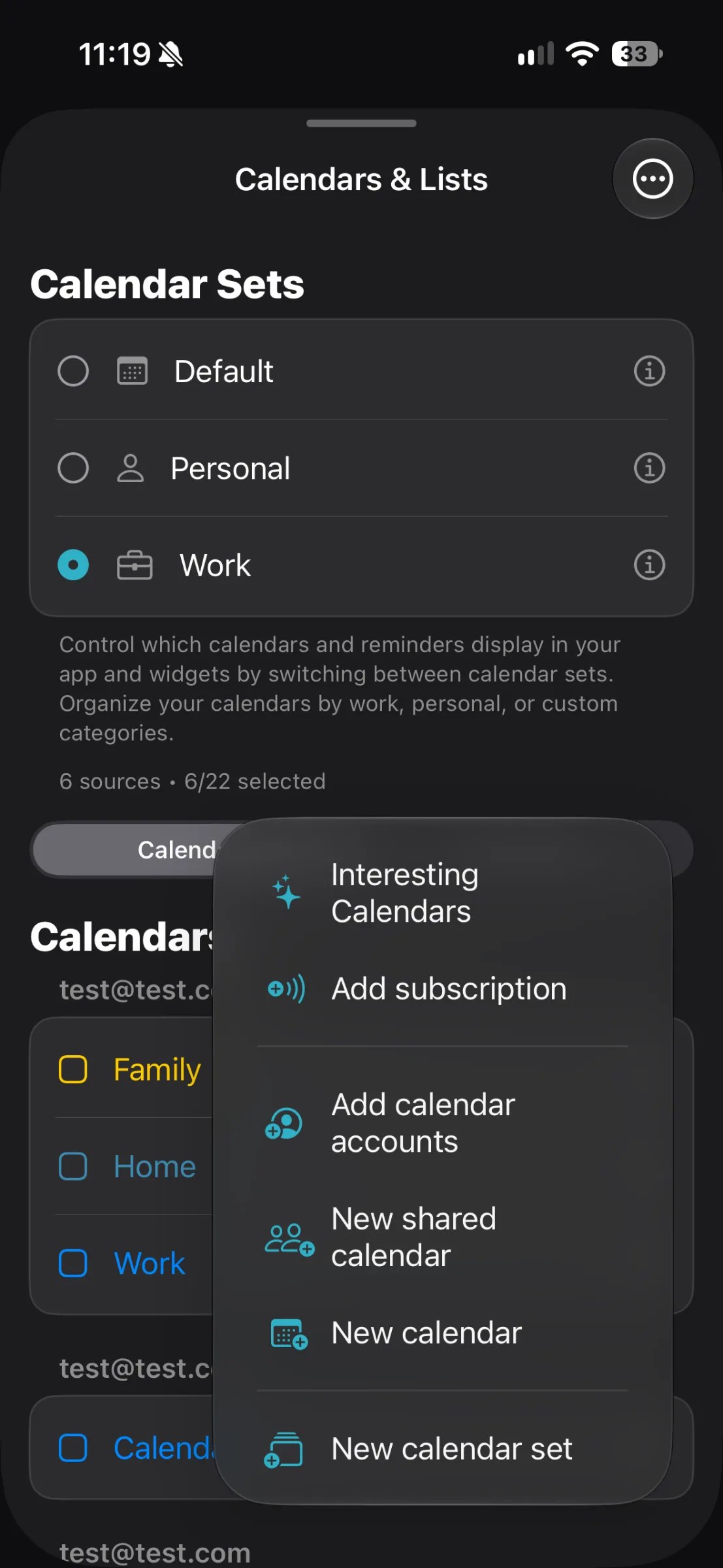
You can also add a custom ICS subscription directly in TapCal: open Settings > Calendars & Lists and tap “Add subscription”. TapCal’s help guide confirms these are read-only feeds. That means you can view the dates, but you can’t edit the publisher’s events as if they were your own. If you want the calendar visible in more than one app, adding it through Apple Calendar is a straightforward starting point; if you add it directly in TapCal, manage its visibility there.See the TapCal subscription guide for the current menu path.
Once it is visible, the school feed sits alongside the calendars you already use. TapCal’s month view and widgets show event titles, making it easier to distinguish a half-term break from an ordinary day at a glance. Give the school calendar its own colour if that helps you pick it out, and hide it when you want a less crowded view.
What updates do, and what they don’t
A live feed can reflect changes made by its publisher, but it is not a guarantee that every change will appear on your iPhone immediately. The publisher must update the calendar first, and your calendar service needs to fetch the revised feed. The East Sussex council page describes its subscription as getting automatic updates, but doesn’t promise a particular refresh time. If a date has changed at short notice, confirm it with the school rather than waiting for your calendar to refresh.
Also check whose dates the feed actually represents. A council may publish common dates for certain schools in its area, while individual schools set their own INSET days or follow a different calendar. Compare the feed with the school’s own website or latest message, especially before booking travel or arranging childcare. If the school provides a separate calendar, that may be the better one to subscribe to.
If the calendar isn’t showing
Check that the subscription was added successfully and that its calendar is selected in the Calendars list.
Make sure the feed address came from the publisher’s subscription option, not from a PDF or a static download.
If the feed is visible in Apple Calendar but not TapCal, check TapCal’s calendar visibility settings. If you added it directly in TapCal, check there rather than assuming the Apple Calendar list controls it.
If the link no longer works or dates look incomplete, return to the school or council page for a current feed and confirm the dates with the school.
Start with your school’s official calendar page and look for a subscription link. Once you’ve added the feed and checked that it covers your school, you can see term dates alongside everyday plans without typing them in one by one. For more about the file and subscription options, read how to add an ICS calendar feed to iPhone.